Technology

Digital accessibility, Apple presents new features 2025

The company opened its dedicated division 40 years ago. Apple Stores will have dedicated spaces to explain the new functions
4' min read

4' min read

15 May is Global Accessibility Awareness Day, an international day celebrated every year this month to raise awareness of digital accessibility. Apple started the division responsible for developing these solutions 40 years ago. A path that followed technological and device development: the arrival of voice over on the iPhone in 2009, the "MFi hearing aids". "Made for iPhone hearing aids" - i.e. iPhone-compatible hearing aids in 2014, the "accessibility reader" mode to facilitate reading for users with visual or cognitive disabilities last year, and so on.

For 2025, it introduced a number of new features, coming later this year, starting with accessibility tabs on the App Store, then the Mac Lens, Braille Access and Accessibility Reader, and more. Throughout May, there will be dedicated tables in some Apple stores to highlight accessibility features on various devices. In addition to Today at Apple sessions dedicated to this throughout the year.

Loading...

"Accessibility is part of Apple's DNA," said Apple CEO Tim Cook. "Creating technology that works for all people is a priority for us, and the innovations we're making available this year fill us with pride. We will offer tools to help people access vital information, explore the world around them and do everything they love."

"At Apple, we have 40 years of accessibility innovation behind us, and we are committed to always pushing the envelope by introducing new accessibility features for all of our products," said Sarah Herrlinger, Senior Director of Global Accessibility Policy and Initiatives at Apple. "With the power of the Apple ecosystem, these features integrate seamlessly to offer people new ways to interact with the things they care about most."

Accessibility tabs arrive in the App Store

.

Accessibility tabs introduce a new section in the App Store product pages that will highlight accessibility features within apps and games. These tabs will offer users a new way to find out if an app is accessible before downloading it, giving developers the opportunity to better inform and explain to people the features their app supports. These include VoiceOver, 'Voice Control', 'Larger Text', 'Sufficient Contrast', 'Reduce Motion', transcripts, and more.
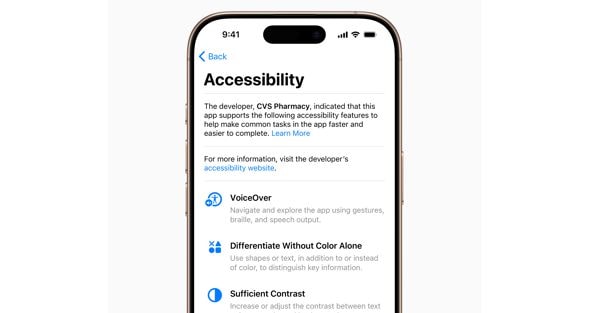
Le schede accessibilità per le app

A new Lens app for Mac

.

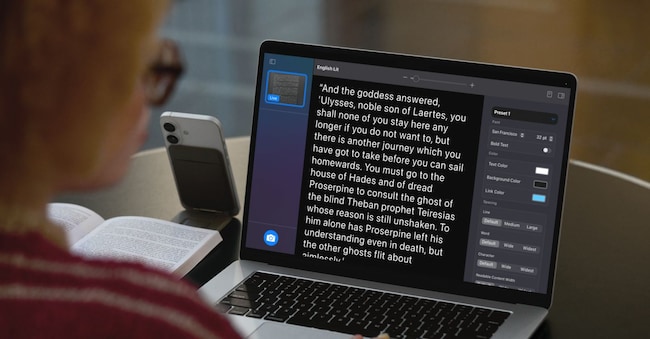
Since 2016, the Lente app on iPhone and iPad has offered people who are blind or visually impaired tools to zoom in, read text and detect objects around them. This year, the Lente app is coming to the Mac to make the real world more accessible to visually impaired people. The Lente app for Mac connects to the user's camera, allowing them to zoom in on what is around them, for example, a screen or a whiteboard. Lente works with the Continuity camera on the iPhone and connected USB cameras, and supports reading documents via Desktop Overview.

With multiple live session windows, users will be able to work in multitasking by viewing a presentation with a webcam and at the same time follow a book with Desktop Overview. With customised views, they will be able to adjust brightness, contrast, colour filters and even perspective to make text and images easier to read. They will also be able to capture, group and save views to work on them later. In addition, the Lens app for Mac integrates another new accessibility feature, Accessibility Reader, which transforms text captured in the real world into a customisable readable format.

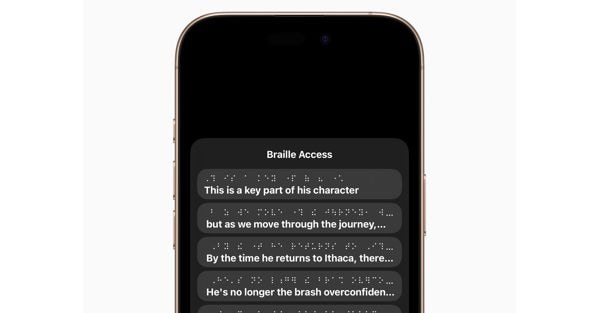
Lettura braille

A new braille experience

Braille Access turns iPhone, iPad, Mac and Apple Vision Pro into complete tools for taking notes in braille, the tactile writing and reading system used primarily by people who are blind or visually impaired. With an integrated app launch function, users can easily open any app by typing with 'Input Braille screen' or a connected braille device. With Braille Access, it is possible to take notes on the fly in braille format and perform calculations using Nemeth's braille code, often used in classrooms for science and maths. Users can open Braille Ready Format (BRF) files directly from "Braille Access", unlocking a wide range of books and files previously created on braille note-taking devices. And thanks to an integrated version of 'Live Transcripts', they can transcribe conversations in real time directly onto braille displays.

The new Accessibility Reader

.

Accessibility Reader is a new system-wide reading mode designed to make reading text easier for users with various disabilities, such as dyslexia or low vision. Available on iPhone, iPad, Mac and Apple Vision Pro, Accessibility Reader offers people new ways to personalise text and focus on the content they want to read, with many options for font, colour and spacing, as well as support for 'Content Read Aloud'. The Accessibility Reader function can be launched from any app and is integrated into the Lente app for iOS, iPadOS and macOS, allowing users to interact with text detected in the real world, such as books or restaurant menus.

"Live Transcripts" arrives on Apple Watch

.

Designed for people who are deaf or hard of hearing, "Live Listening" controls arrive on the Apple Watch with a new set of features, including live transcriptions in real time. "Live Listening" turns iPhone into a remote microphone for broadcasting content directly to AirPods, Beats headphones or "Made for iPhone" hearing devices. When a session is active on iPhone, users can view "Live Transcripts" of content captured by iPhone on a paired Apple Watch while listening to audio. Apple Watch acts as a remote control to start or stop "Live Listening" sessions, or to go back to a session and retrieve something that may have been lost. With the Apple Watch, users can control 'Live Listening' sessions even from across a room, without having to get up in the middle of a meeting or lecture.

A better view with Apple Vision Pro

.

For people who are blind or visually impaired, visionOS will expand accessibility features for vision using Apple's advanced Vision Pro camera system. With powerful upgrades to the Zoom function, users will be able to zoom in on everything visible, including their surroundings, using the main camera. For those using VoiceOver, the 'Real-Time Recognition' feature in visionOS uses on-device machine learning to describe surroundings, find objects, read documents, and more.

Copyright reserved ©
Loading...

Brand connect

Loading...

Newsletter

Notizie e approfondimenti sugli avvenimenti politici, economici e finanziari.

Iscriviti