
Apple issues spyware warning for iPhones: alerts sent to users in 110 countries
Security notifications also appear on the lock screen. Here are Cupertino’s tips

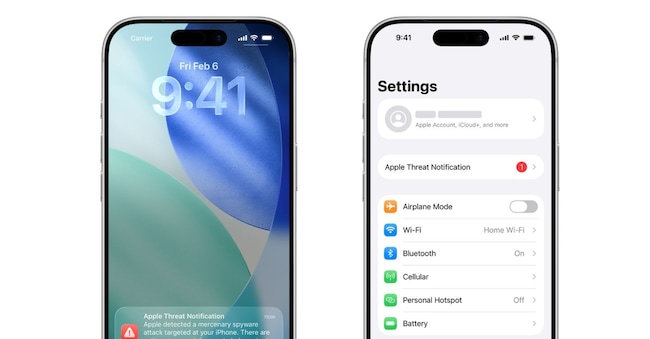
Apple is changing the way it alerts users when it suspects a cyberattack. The Cupertino-based tech giant has sent out a new series of notifications to users in 110 countries who may have been targeted by mercenary spyware – highly sophisticated and expensive surveillance software. The new feature is that the warning now appears directly on the iPhone’s lock screen, as well as in Settings and via email.
It’s a sort of red warning light on the digital dashboard. It doesn’t confirm that the iPhone has already been compromised, but it indicates that Apple has detected activity consistent with a targeted attack. And the company urges users to take the warning very seriously. Since 2021, these notifications have been sent out several times a year and, in total, have reached users in over 150 countries.
The new feature is that alerts now appear directly on the iPhone’s lock screen, as well as being sent via email and text messages.
According to TechCrunch, several people have reported – both publicly and privately – that they received spyware alerts from Apple over the weekend, after Apple sent out a new wave of notifications last Friday to warn customers that they had been targeted by powerful spyware.
Apple in an advisory does not, however, reveal who the attackers are or what technical factors triggered the alert. Cupertino argues that publishing these details would help spyware developers to change their tactics and make themselves invisible. It is a game of chess in which revealing your move often means losing the game.


