
ChatGPT Canvas, the new feature enhancing artificial intelligence
Users will now be able to customise the function according to individual needs, such as training the chatbot to specialise on a specific topic

2' min read
2' min read
OpenAI continues to innovate the artificial intelligence landscape with the launch of Canvas, a feature that promises to enrich the use of the ChatGPT chatbot, making it more versatile and powerful. This tool is designed for those who want personalised support, both in writing and programming, transforming ChatGPT into a true interactive assistant, meeting the needs of an increasingly heterogeneous audience. Whether for creative writing, document review or code development, Canvas promises to be an indispensable ally in optimising productivity and results.
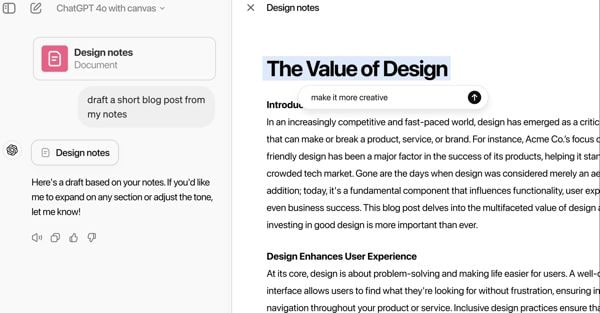
Canvas, already accessible through the ChatGPT desktop application for Windows, has been described by OpenAI as a 'Google Docs with AI superpowers'. The interface allows users to work on text or code interactively, receiving advice and corrections in real time alongside the classic chatbot conversation window.
The announcement of Canvas was made as part of the '12 Days of OpenAI', an Advent calendar that anticipates the Christmas holidays with a series of updates and news from the world of Ai. Among this year's surprises, in addition to Canvas, is the launch of Sora, the artificial intelligence tool for creating videos, but currently not yet available in Europe.
How Canvas Works
Canvas introduces a visual and collaborative approach to writing and programming. Users can highlight specific sections of a document or code and get targeted suggestions from ChatGPT, improving workflow in real time. In the bottom right-hand corner, the 'suggest editing' button allows users to set the length, reading level (middle school, high school, university, etc.) and add finishing touches as desired by selecting the text to be improved and corrected.
One of the main new features compared to the beta version is the extended support for the Python programming language. Developers can now use Canvas to correct errors, explore code alternatives and customise the model according to their needs. This makes the tool particularly useful for professionals working on complex projects or for those who want timely feedback during the development phase.

