
Google Earth Web includes a free flight simulator that can be accessed via a web browser
A new way to board a virtual aeroplane and explore the planet from above is now available

Air travel is one of the safest modes of transport in the world, yet even today many people feel anxious at the mere thought of flying: as highlighted by the American Psychological Association, fear of flying affects up to 40 per cent of people, to varying degrees, causing difficulties in personal relationships, professional goals and travel plans.
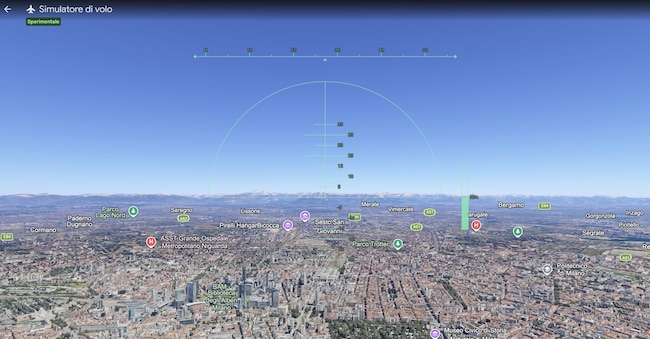
It is precisely for this reason that flight simulators have, for some time now, been more than just a tool for aviation enthusiasts; they are very often used to familiarise oneself with a world that has always seemed mysterious. The latest news comes from Mountain View: on 12 June, in fact, Google introduced the flight simulator to the web version of Google Earth as well. A feature that, until recently, was only accessible via the professional desktop application, but can now be tried for free via a browser, without downloading or installing any software: although, at least for the time being, it is in experimental form.
This new feature is not intended to offer an extremely realistic or technically advanced flying experience; rather, it is an interactive mode that transforms the classic Google Earth map into a dynamic journey, making use of satellite imagery, terrain elevation data, 3D buildings and geographical details already present on the platform; despite this more accessible approach, the experience is still, at least in part, reminiscent of the best-known flight simulators. To launch the simulator, simply open Google Earth online, click on ‘Tools’ in the top bar and select ‘Flight Simulator’. Before you start, however, it’s a good idea to position yourself over a place of interest: this way, you’ll be able to fly over a recognisable area, avoiding taking off over the ocean or deserted, unremarkable areas. Furthermore, to make the view more realistic, it’s advisable to switch from the standard map to satellite view.
You’ll be able to glide over city centres, seas and mountain ranges: to increase the aeroplane’s engine thrust and pick up speed, use the ‘Page Up’ key; to slow down, use the ‘Page Down’ key; the left and right arrow keys are used to bank the aeroplane and thus change direction during flight, and those who prefer more natural controls can choose to use the mouse to make manoeuvres smoother and more intuitive.
To conclude, it is worth noting that the simulator uses data from Google Earth, loading it in real time; therefore, the images are displayed as you move across the map. For this reason, if you fly very quickly or are using a slow internet connection, some elements may appear with a slight delay or at a lower quality. Overall, however, these limitations do not detract from the experience, which remains an engaging way to explore the planet from a different perspective.

