
How to object to the use of information for Ia in Meta: detailed guide
Find out how to prevent Meta from using your information for Artificial Intelligence by following simple steps in your profile.

-U00604486084Zec-1440x752@IlSole24Ore-Web.jpeg?r=650x341)
2' min read
2' min read
From 27 May in Europe and Italy, Meta starts training its artificial intelligence models using public information that users over 18 have posted on Facebook and Instagram such as posts, photos, comments, likes and stories. WhatsApp is excluded.
To fill out the form "Oppose the use of your information for Ia in Meta" by 26 May you have to:
1 - go to your profile
2 - click on Settings and Privacy (gear symbol)
3 - Privacy Centre
4 - click on the blue 'oppose' link
5 - read the following directions (they are the same as on the page):
Oppose Use of Your Information for AI in Meta
You enjoy the right to object to Meta's use of your public information from Meta's Products and your interactions with AI in Meta features to develop and improve generative AI models for AI in Meta. You can submit this form to exercise this right.
The AI in Meta is our collection of generative AI functions and experiences, such as Meta AI and Creative AI Tools, as well as the models that enable them to work. Many of these models are available through an open platform to support researchers, developers, and other community members.
Here are some examples of public information about our Products:
- Posts
- Photos and their captions
- Comments
We will not use the content of your private messages with friends and family to train our AIs, unless you or someone in the chatroom chooses to share those messages with our AIs.
If you submit an objection, we will send an email confirming that we will not use your public information from Meta Products or your interactions with AI features in Meta in the future to develop and improve generative AI models for AI in Meta.
Your objection will also be applied to all accounts added to the same Account Management Center as the account you are logged in with to submit this form. You will have to submit a new form for each of your other accounts that you have not added to the same Account Management Centre as this account. Visit the Help Centre to find out more about the Account Management Centre.
We may still process information about you to develop and improve the AI on Meta, even if you object to or do not use our Products. For example, this could happen if you or your information:
- appear in an image shared with everyone on our Products by someone who uses them;
- are mentioned in posts or captions that someone else shares on our Products
To find out more about the rights you have in relation to the information you have shared on Meta's Products, please see our Privacy Policy.
6 - there is a part to fill out with email associated with your Meta account and a brief explanation of why you object (a sentence like "I do not wish my content to be used for AI training" may suffice;
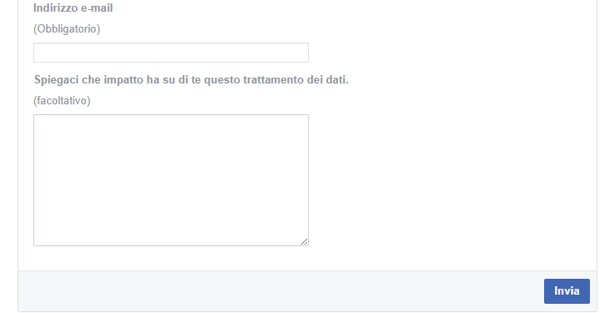
7 - After sending, you will receive a confirmation email. It does not always arrive immediately, so it is normal if a few hours pass. You do not have to do anything else: the objection takes effect immediately upon receipt by Meta.


