Guides

Identity theft, how not to be locked out of your digital life

The loss of an Apple, Google or Microsoft account can trigger a digital paralysis that blocks work and documents. Password managers, passkeys, trusted contacts, official apps and physical keys are the key tools to prevent the worst and make one's online identity recoverable.

by Alessandro Longo

4' min read

Translated by AI
Versione italiana

4' min read

Translated by AI
Versione italiana

We can no longer log into our Apple, Microsoft or Google account? This can be the beginning of a digital catastrophe. Sometimes password recovery fails, for many reasons. Suddenly we can no longer read mail, access our calendar, sign documents, open files in the cloud. For a professional or a company, this means blocked hours of work. Days, even.

So what to do? There are a few precautions to prevent the worst.

Loading...

Password manager

The first defence is a structured credential management. In practice, a password manager. An integrated one may be OK (Apple Passwords on iPhone, iPad and Mac; Google Password Manager in Chrome and Android; the integrated manager in Edge for Microsoft accounts), but for those working on mixed ecosystems, a stand-alone solution is often more effective.

Products such as Bitwarden, 1Password and Dashlane offer apps for all major platforms, browser extensions and additional functions such as breach control, secure credential sharing and passkey management. Dashlane and 1Password are often chosen by companies and professional firms for their combination of simple interfaces and administrative tools; Bitwarden, which is open source, is popular among advanced users and small businesses also thanks to a free plan that allows unlimited use on multiple devices.

First step: define a single long, complex but memorable 'master password'. Second: activate two-factor protection on access to the manager itself, using an authentication app or a physical key. Third: make sure the vault is synchronised in the cloud, so it can be opened from another device if the master is lost or stolen.

Passkey

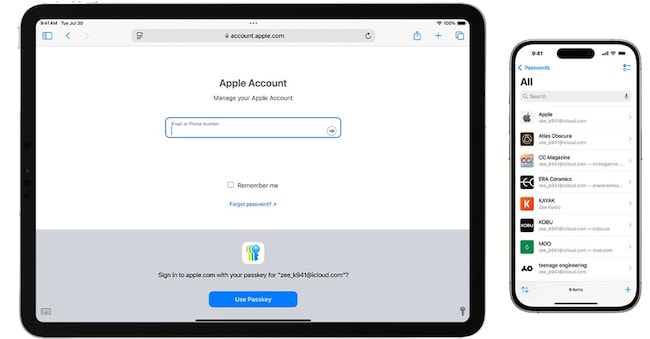
Over the past two years, Apple, Google and Microsoft have strongly pushed passkeys, credentials based on the Fido standard that replace the traditional password with a cryptographic mechanism linked to the device and unlocked with a face, fingerprint or Pin.

For the end user it means two things. On the one hand, greater security: there is no longer a password that can be stolen over the Internet. On the other, easier access.

If you do a lot of work from Windows desktops, it is worth activating passkey management in Edge's integrated password manager right away and enabling the use of passkeys on critical accounts (Google Workspace, Microsoft 365 services, banking and management platforms that allow it). For those within the Apple ecosystem, the way is through iCloud Keychain and the Settings app; for Android/Chrome users through the Security section of the Google account.

Caution: passkeys attached to a single device, if not synchronised or replicated on a second device, can become a sticking point. It is good to have at least two trusted devices with the same passkeys, or use cloud synchronisation. Finally, if the passkey is a pin, be careful not to have it spied on in a public place. If our device is then stolen, that's it.

Email, phone numbers and trusted contacts

Almost all recovery systems start with a message sent to a 'trusted' email address or telephone number. The problem is that we usually record the very address or number that may no longer be available in the event of a phone theft or cyber attack.

The first technique, which is trivial but often ignored, is to set up a second recovery email address in good time, on a different service from the main one. Those who use Gmail can create an Outlook or Yahoo box to keep just for this; those who live in the Microsoft ecosystem can use a Gmail address as an emergency email. The same applies to telephone numbers: if possible, it is advisable to register, in addition to one's own, the fixed office number, the mobile phone of a spouse or partner, or a separate company line.

The second concerns 'trusted contacts'. Google introduced in 2025 the possibility of indicating up to 10 trusted people with Google accounts who can help us get back in when other methods do not work. The mechanism is simple: the blocked user shares a code with the contact, the contact receives a notification or email and has to select the correct code from various options. It is a way of bringing the logic of 'witness statements' into the digital world, without sacrificing technical verification. Apple offers a similar system.


Apple, Microsoft and Google mobile apps: identity in your pocket

Another channel that is often overlooked is the official app of major suppliers. Gmail or YouTube on an Android phone, the Outlook app on an iPhone, the Apple Support app all count as additional proof of identity.

For instance, when trying to access a Google account from a new browser, the system often asks for confirmation from the already connected smartphone.

Apple allows you to reset your account password if you are already logged in with that ID on a trusted iPhone, iPad or Mac. In practice, the device becomes a digital 'ID'.

Physical Keys

The next step are Fido2 physical keys, such as YubiKey, Feitian and other similar devices. They connect via usb, nfc or bluetooth to PCs and smartphones and confirm the user's presence with the press of a button, pin or biometric sensor. Many high-profile services, from Google and Apple accounts to Microsoft corporate logins, now support the use of physical keys as a second factor or even in passwordless mode.

The risk, of course, is losing them. It is better to register at least two for each important account: a key 'to carry around' and a backup key to keep in the safe or in the company. And, again, make sure that there are alternative recovery routes in case both are lost.

Password managers, passkeys, trusted contacts, authentication apps and physical keys: at least some of these are key ingredients of our digital security, which increasingly coincides with our mental and financial peace of mind.

Copyright reserved ©
Loading...

Brand connect

Loading...

Newsletter

Notizie e approfondimenti sugli avvenimenti politici, economici e finanziari.

Iscriviti