
Filmmakers with a finger, social editing apps hit digital stores
The ever-improving performance of smartphones is complemented by apps that can turn anyone into a professional video maker

3' min read
3' min read
Short videos, funny clips, AI effects and professional filming. The ever-improving performance of smartphones is complemented by apps that can turn anyone into a little filmmaker. In this context, Meta is leading the way with the launch of Instagram Edit. The numbers bear this out: according to recent findings by Appfigures analysts, Instagram was the most downloaded app in March on Android, with 41 million downloads. On iOS, social doesn't make the top ten, but 'social editing' apps lay down the law: CapCut is the third most downloaded on iOS, further down TikTok, ahead of Snapchat. Instagram surpassed TikTok throughout 2024, being the non-game app of choice for users of both platforms. In addition to this, a Piper Sandler survey of teenagers found that Instagram is the most used social app, with 87% monthly usage, compared to 79% for TikTok and 72% for Snapchat. In short, after social, here are growing opportunities for internal customisation, to entice people to stay longer on the same app, without turning to third-party software.
Instagram Edits
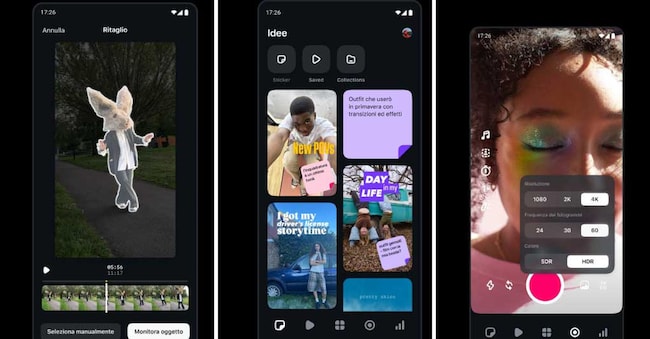
.New to Meta is an all-in-one solution for creators, for an integrated workflow from recording to editing to exporting in high resolution (even 4K) without annoying watermarks. Precise editing at the individual frame level, advanced camera management settings (from resolution to frame rate, dynamic range and flash and zoom options), and innovative AI animation features to bring images to life are just some of the arrows in its bow. Edits does not stop there, integrating tools for background manipulation (from green screen to video overlay), an extensive font library, sound and audio effects, creative video filters, dynamic stickers and options for audio enhancement and automatic subtitle generation. A focus is also placed on performance analysis, with a section dedicated to post statistics to help creators better understand the dynamics of their audience.
CAPCUT
The market already offers well-established alternatives. CapCut has earned a reputation as a powerful and versatile app, offering free advanced editing tools, a wide range of special effects and the ability to work on multi-track timelines, with paid options to unlock additional features, such as online collaboration in the Creative Suite. The addition of customisable text with various styles and animations, along with a wide range of stickers and emoji, helps to make videos more engaging. Transitions allow smooth transitions between clips, while special effects add originality. Once editing is complete, the video can be exported in the desired resolution and format, with direct sharing options on social platforms and the ability to save it to the device.
FilmoraGo
.FilmoraGo is another popular choice, even among newcomers. The application provides several tools for video editing, allowing you to adjust parameters such as brightness, contrast, saturation and playback speed, as well as offering filters and visual effects to customise the style of your projects. As far as audio is concerned, FilmoraGo allows background music to be added by choosing from the integrated library, importing personal music files or recording a narrator's voice, with the possibility of adjusting the volume and inserting sound effects. Depending on the application version or subscription, more advanced features such as picture-in-picture, video stabilisation, more precise colour adjustment and watermark-free export may be available.
The iOS side
.Apple users have a trusted ally in iMovie, the native app for all Apple devices. Even with just an iPhone, editing is easy and very precise. From editing the frames in the timeline to inserting copyright-free audio, the opportunities to create your own masterpiece here are many. Unlike other competitors, you can also choose the output quality and scaling when posting on social media.

